
TCGA PanCancer Atlas
10,967
tumour samples
32
cohorts
Clinical, survival, mutation, copy-number and RSEM expression. Also available as the GDC harmonisation with TPM expression.
Validated analyses over governed data products such as TCGA and MSK. Only results leave Tag.bio.
A data product is one governed table, one row per entity, with its own validated analyses: survival, clustering, differential expression, cohort comparison.
Clinical, survival, mutation, copy-number and RSEM expression. Also available as the GDC harmonisation with TPM expression.
Avelumab + axitinib vs sunitinib in advanced renal cell carcinoma: PD-L1, PFS and OS, RNA expression, immune cell estimates and HLA.
Memorial Sloan Kettering sequencing cohort, deduplicated across 112 studies.
200 cancer genomics studies across 127 disease types, 2011 to 2025.
18 pediatric oncology studies from TARGET, St Jude and others.
MS-DRG, diagnoses, procedures, length of stay, readmissions and expense, for exploring healthcare costs.
CCLE, NCI-60 and Sanger lines, plus patient-derived xenografts.
Pathway and variant annotations that join onto results from the other products.
Enterprise sites add their own data products.
The model chooses the analysis; the protocol computes it. Same cohort and arguments, same numbers, in chat and in Studio.
Each exchange shows the protocol and the exact arguments that ran.
Sandbox Python appears in the chat alongside its result.
Browse the data products you are allowed to see and what each one contains.
list_data_products · describe_data_product · list_variables · list_levels
Questions run over the full dataset, not a sample; only the answer comes back.
run_query
Each data product's own validated analyses: survival, UMAP clustering, cohort comparison, differential expression and more.
run_protocol · get_protocol_result · describe_protocol
Pick filters the way the Studio cohort builder does; the same cohort gives the same numbers in both.
cohort_options · build_cohort · argument_options
Projections and results come back as charts you can hover and explore.
render_chart
Report-style analyses return their tables (counts, p-values, odds ratios), not just pictures.
report results
Large tables become a short summary plus a full file to download or page through.
read_artifact · download links
When no curated analysis fits, the assistant's Python runs in an isolated job inside Tag.bio.
run_analysis · get_job · cancel_job
Runs from your assistant appear in Tag.bio Studio as cards you can reopen and share.
Studio history
Connect with your normal Tag.bio login. Okta, Azure AD and SAML sites sign in the same way as Studio; API keys also work.
OAuth · API key
Refuses empty or impossible cohorts, checks arguments first, explains empty results, keeps p-values precise.
cohort guard · argument checks
One-click starting points: explore a product, UMAP clustering, survival analysis, compare cohorts.
MCP prompts
When a question needs a join, a custom model or anything no curated analysis covers, the assistant writes Python and Tag.bio runs it in an isolated sandbox pod inside the cluster. The code pulls what it needs under your entitlements, and only the small result comes back.
Every call and every job runs as you; you see exactly the data products your Tag.bio account can see.
Model-written code has no internet access. It can reach only the Tag.bio gateway, and it cannot install packages.
Each run is its own job. It starts for one question and can be cancelled from the chat at any time.
numpy, pandas, scipy, scikit-learn, statsmodels, umap-learn, igraph, leidenalg, matplotlib and the Tag.bio Python SDK.
A job can load tables from earlier analyses directly, without pulling the data again.
Download links expire after 30 minutes; paged reads are yours alone, for 6 hours.
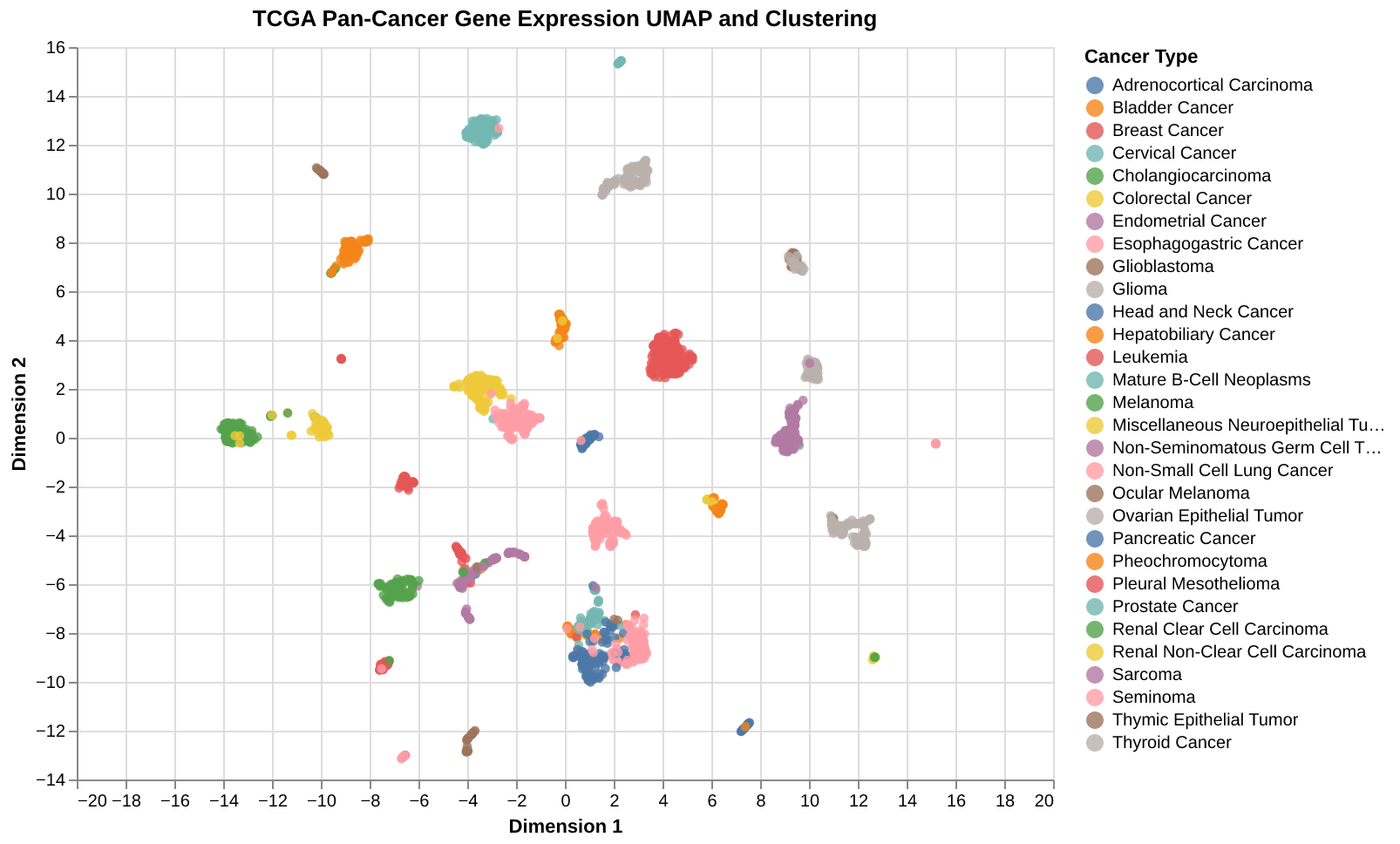
A real run on TCGA. The assistant picks the data product's own UMAP analysis, runs it inside Tag.bio and returns labelled clusters with a chart. No rows of patient data cross into the chat.
Start free with a Tag.bio account, then add this address to your assistant:
https://mcp-prod.tag.bio/mcp
https://mcp-prod.tag.bio/mcp and choose Connect.claude mcp add --transport http tagbio https://mcp-prod.tag.bio/mcp
Then run /mcp, choose tagbio and Authenticate.
https://mcp-prod.tag.bio/mcp and keep Authentication on OAuth.https://mcp-prod.tag.bio/mcp as a remote MCP server: run codex mcp add tagbio --url https://mcp-prod.tag.bio/mcp, then codex mcp login tagbio.Enterprise customers on their own Tag.bio site use their site's address instead, for example https://your-site/mcp. Private-network sites work from Claude Code or Claude Desktop on that network.
Open-source skills that teach your assistant to analyse and build Tag.bio data products.
Sign up for a free month with 400 credits, no card needed. Then $25 a month. Eligible universities and nonprofits receive a one-year free subscription using a work email address.
By signing up you agree to the Terms of Service and Privacy Policy.
Free month with 400 credits, no card needed.
400 credits a month. Need more? $25 per 400.
Your own site, data and sign-in.
support@tag.bioThe data products your Tag.bio account can access. Today: public datasets such as cBioPortal (TCGA, MSK, pediatric, cell lines), gene and variant annotation, and a renal cancer trial.
Analyses run inside Tag.bio. The results you ask for (counts, statistics, charts) are returned to your assistant.
Yes, from Claude Code or Claude Desktop on that network, using your site's own address.
Disconnect and reconnect the connector once; assistants cache the tool list.